Introduction
WO Mic can turn your phone to be a microphone for your computer. You do not need to pay a cent to buy a gadget. And it's mobile if you choose wireless transport. Millions of people have installed it and are using it daily for talking, recording, voice remote control and many other activities.
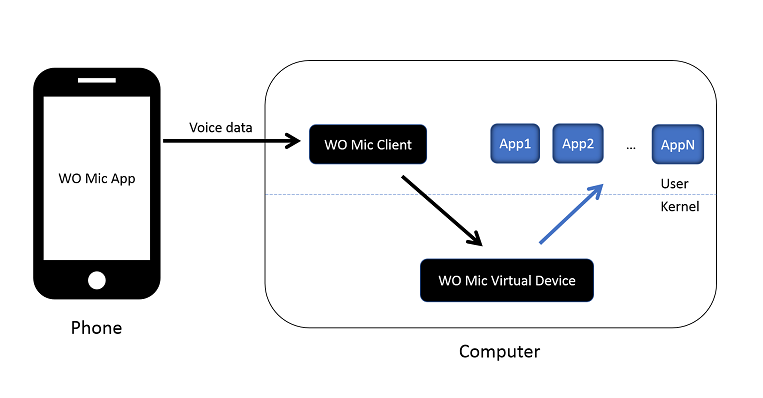
Three components cooperate to achieve that:
- WO Mic App which runs on phone. It captures your voice through phone microphone and transmit them to computer.
- WO Mic Client which runs on computer. It connects to app, receives voice data and passes them to virtual mic device.
- WO Mic Virtual Device which also runs on computer, though in kernel space. It receives voice data from client program, simulates a real microphone device, and provides audio data to applications like Sound Recorder.
Below diagram shows how captured voice data is flowing through these components:
Main features:
- Wireless microphone without any cost
- Can be used with any programs on PC just like REAL microphone
- Very short lag
- Easy to configure and use
- Supports auto reconnection when your PC reboots
- Support multiple connection methods: USB, Bluetooth, Wi-Fi, and Wi-Fi direct
- Audio format: 48000 sampling rate, 16 bits per sample, mono channel
Transport support
Data can be exchanged over Bluetooth, Wifi or USB cable. The table below summarizes transport support by WO Mic apps and client:
| Android app | iOS app | Windows client | |
|---|---|---|---|
| USB | ✔ | ✘ | ✔ |
| Bluetooth | ✔ | ✘ | ✔ |
| Wi-Fi | ✔ | ✔ | ✔ |
| Wi-Fi Direct | ✔ | ✘ | ✔ |